Hello friends, today I’m gonna show you how to make a compass app in sketchware.
1. In View area add an ImageView imageview1. Set image of a Compass as it’s image. Make sure that North is towards the top.
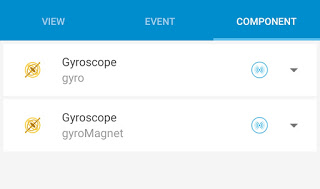
2. Create a Gyroscope component gyro and another Gyroscope component gyroMagnet.
3. Create a More block extra and put following code in it.
}

private float[] floatGravity = new float[3];

private float[] floatGeoMagnetic = new float[3];

private float[] floatOrientation = new float[3];

private float[] floatRotationMatrix = new float[9];

{
In onCreate event use blocks
Gyroscope gyro sensor stop,
and Gyroscope gyroMagnet sensor stop.
After that put following code in an add source directly block:
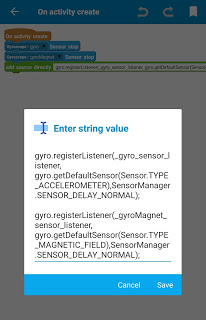
5. In onPause event use blocks
Gyroscope gyro sensor stop,
and Gyroscope gyroMagnet sensor stop.
6. In onResume event put following code in an add source directly block:
gyro.registerListener(_gyro_sensor_listener, gyro.getDefaultSensor(Sensor.TYPE_ACCELEROMETER),SensorManager.SENSOR_DELAY_NORMAL);
gyro.registerListener(_gyroMagnet_sensor_listener, gyro.getDefaultSensor(Sensor.TYPE_MAGNETIC_FIELD),SensorManager.SENSOR_DELAY_NORMAL);
7. In gyro: onSensorChanged event use an add source directly block and put following code:
floatGravity = _param1.values;
SensorManager.getRotationMatrix(floatRotationMatrix, null, floatGravity, floatGeoMagnetic);

SensorManager.getOrientation(floatRotationMatrix, floatOrientation);
imageview1.setRotation((float) (-floatOrientation[0]*180/3.14159265359));
8. In gyroMagnet: onSensorChanged event use an add source directly block and put following code:
floatGravity = _param1.values;

SensorManager.getRotationMatrix(floatRotationMatrix, null, floatGravity, floatGeoMagnetic);

SensorManager.getOrientation(floatRotationMatrix, floatOrientation);

imageview1.setRotation((float) (-floatOrientation[0]*180/3.14159265359));
Now your project is ready run it.

 SKED BY UTTER